Bank-linked or manual: the one decision to make first
Bill management apps split into two camps. Bank-linked apps read your transactions, spot recurring charges and show bills you forgot. The cost is handing over a bank login, connections that drop when a bank changes something, and an app that sees every purchase you make. Manual apps work from bills you type in once. Setting up ten bills takes about ten minutes; after that, repeating bills schedule themselves and there's nothing to reconnect.
If your problem is missed due dates rather than unknown spending, a manual app solves it with less risk. If you suspect forgotten subscriptions, run the free subscription tracker once against your statements, then put what you keep into the app.
Features worth paying for (and ones that aren't)
Worth it: more than one reminder per bill, a home-screen widget that shows the week's bills, and a full backup. In Bill Organizer those are part of optional Pro. The app is free with ads, and everything free stays free. Optional Bill Organizer Pro removes ads and adds all themes, the "Due this week" home-screen widget, full backup & restore, CSV export, up to 3 reminders per bill, spending insights: try it free for 7 days, then $2.99 a month or $14.99 a year, or pay $24.99 once for lifetime Pro (US prices).
Usually not worth it: bill negotiation that keeps a share of the savings (you can call the provider yourself with the bill increase calculator numbers in hand), and premium budgeting if you only need bills.
Set up a bill management app in 15 minutes
- Pull the last two months of bank and card statements, and the list of monthly bills for categories.
- Add each bill with its amount, due date and repeat. Use an average for bills that vary, like electricity.
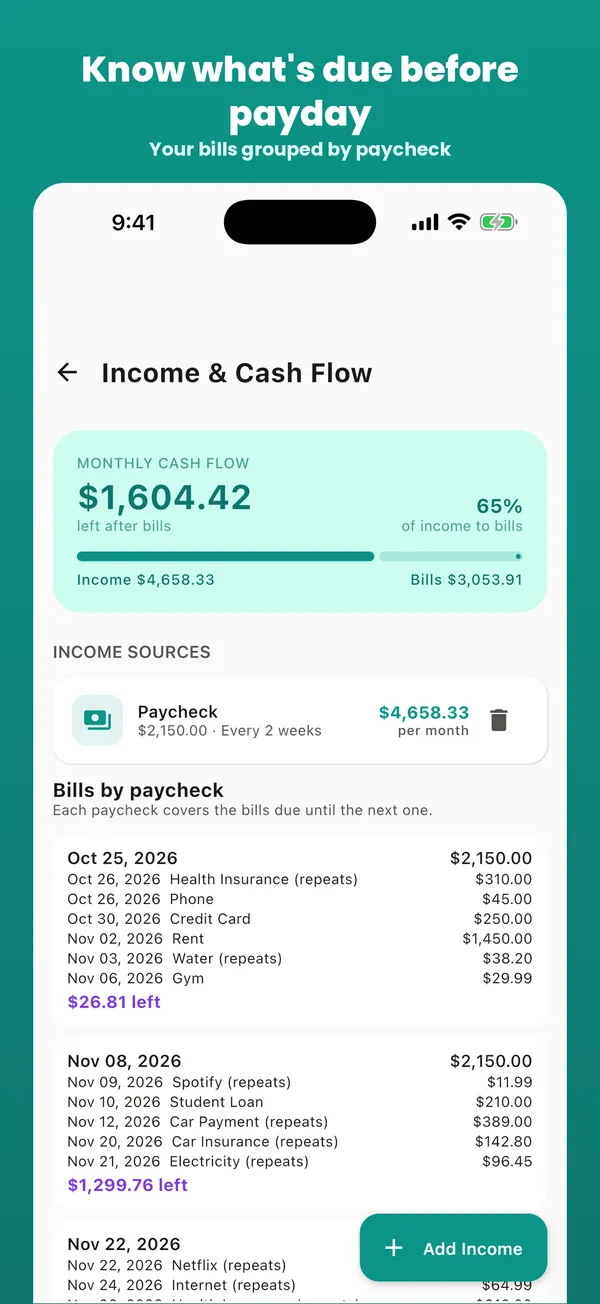
- Add your paychecks, so the app can show which paycheck covers which bill.
- Choose a reminder per bill: 3 days before for anything paid manually, the day of for autopay bills (to check the amount).
- Turn on the weekly digest or widget, and check it every Sunday.
Prefer a computer? The same steps work in the free online bill tracker, and bill organizer programs for PC and Mac are compared here. Coming from Prism? See the Prism alternatives.