Free · No account · No bank login
The free bill organizer for your computer and your phone
Keep every bill, due date and subscription in one calm list. Know what's due this week, what's left to pay this month, and never pay a late fee because you forgot.
Also on iPhone and Android, with reminders and a widget:
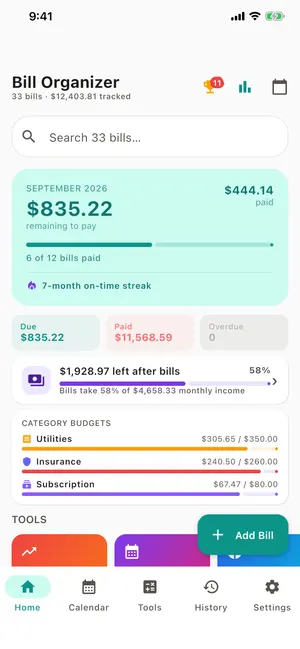
Everything a monthly bill tracker should do, nothing it shouldn't
Every bill, sorted by urgency
Overdue, due today, due soon and upcoming, colour-coded. See what's left to pay this month at a glance.
Repeating bills schedule themselves
Weekly, monthly or yearly. Mark one paid and the next is created with the right due date.
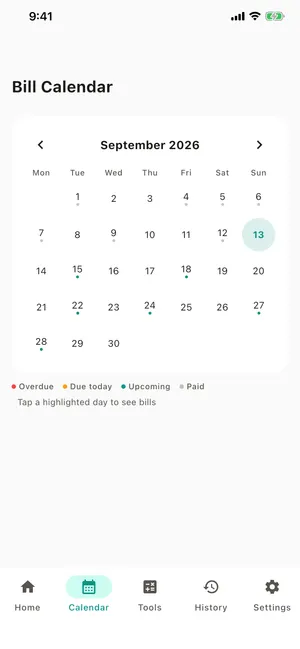
Bill calendar
Every due date in a month view, so you can see which bills land before or after payday.
Income, cash flow & budgets
Add paychecks to see what's left after bills, and set a spending limit per category.
Reminders you choose
Day of, 1, 3 or 7 days before, as phone notifications in the app or calendar alerts from the web.
Private by design
No account and no bank login. Your bills stay on your device, and you can export or delete them any time.
Organize your bills in three steps
- Step 1
Add your bills
Pick from 38 common bills (rent, electricity, Netflix, car insurance…) or type your own. Add the amount, due date and how it repeats.
- Step 2
Pay on time
Check what's due soon, pay it, tap Paid. Repeating bills roll forward on their own, and your month total updates.
- Step 3
See the whole month
The calendar shows when each bill lands. Add income to see what's left after bills, and set budgets by category.
Free money calculators
The same 23 calculators that are built into the app. Any result can be added as a bill in one click.
- Prorated Rent CalculatorMove-in or move-out mid-month
- Credit Card Payoff CalculatorMonths and interest at your current payment
- Debt Snowball & Avalanche CalculatorSnowball vs avalanche, up to three debts
- How Much Rent Can I Afford?The 30% rule and the stricter 25%
- 50/30/20 Budget CalculatorNeeds, wants and savings from take-home pay
- Split Bill CalculatorEqual shares or by income, up to four people
- Electricity Cost CalculatorWhat an appliance adds to the bill
- Emergency Fund CalculatorMonths of essential bills, and how long to build it
Web, iPhone or Android: which should I use?
| Feature | Web tracker | iPhone & Android app |
|---|---|---|
| Bills, due dates, repeating bills | ✓ | ✓ |
| Bill calendar | ✓ | ✓ |
| Income, cash flow, category budgets | ✓ | ✓ |
| 23 money calculators | ✓ | ✓ (offline) |
| Reminders | Via calendar export (.ics) | Push notifications + weekly digest |
| Home-screen widget | – | Android |
| Scan or photograph a paper bill | – | ✓ |
| App lock (Face ID, fingerprint) | – | ✓ |
| Export CSV / JSON backup | ✓ | ✓ (+ PDF) |
| Big screen and keyboard | ✓ | – |
| Price | Free, no ads | Free with ads · one-time ad removal |
Many people use both: plan on the computer, get reminded on the phone. A backup file moves bills between them.
Frequently asked questions
What is Bill Organizer?
A free bill tracker and bill reminder app for iPhone and Android, with this website as its web version. You list your bills with due dates, get reminded before each one, mark them paid, and see what's left to pay each month.
Is there a bill organizer I can use on my computer?
Yes. The online bill tracker on this site runs in any modern browser on Windows, Mac or Chromebook. It's free and needs no account. Your bills are saved in that browser.
Does Bill Organizer connect to my bank?
No. You enter bills yourself, so no bank login is needed and no financial data leaves your device. Many people prefer that. Others use the web tracker next to their banking app.
Is the app really free?
Yes. The phone app is free with ads, and a one-time purchase removes them permanently. There's no subscription. The website and all 23 calculators are free with no ads.
Can I move my bills between the app and the website?
Yes. The app's "Backup to JSON" file restores on the website, and the website's "Backup for the phone app" file restores in the app.
Who makes Bill Organizer?
Dixon App Studio (DixonAppStudio LLC), an independent developer of simple, privacy-first apps. Support is by email at support@dixonappstudio.com.