Free Printable Bill Tracker
Four printable layouts: a monthly bill checklist, a bill calendar, a bills-by-paycheck sheet and a yearly tracker with a box for every month. Print one month or all 12 at once, blank, or fill them with the bills from your online tracker first. Choose "Save as PDF" in the print dialog to keep a digital copy.
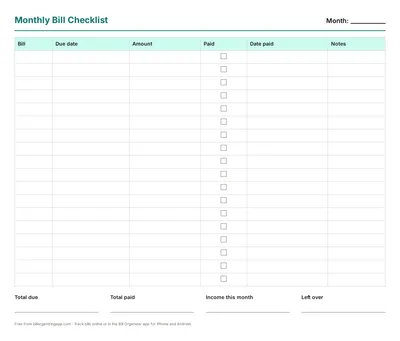
Monthly Bill Tracker
Month: ____________
| Bill | Due date | Amount | Paid | Date paid | Notes |
|---|---|---|---|---|---|
Total due
Total paid
Income this month
Left over
Free from billorganizingapp.com · Track bills online or in the Bill Organizer app for iPhone and Android.
Download the free PDFs
Prefer a ready-made file? Each layout is also a blank one-page PDF (US Letter) to print or save. Free for personal use, no sign-up. For a monthly bill checklist with a filled-in example, or a bill payment checklist routine, see those pages.
Monthly bill checklist
18 rows for bill, due date, amount, a paid box, date paid and notes, with total due, total paid, income and left over.
Bill calendar
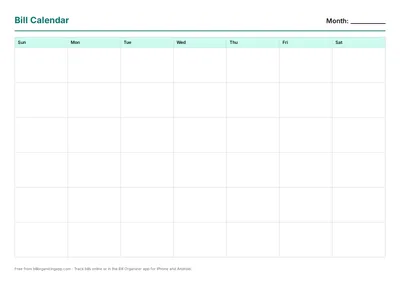
A blank six-week month grid: write each bill on its due day and see which week (and which paycheck) carries the most.
Bills by paycheck
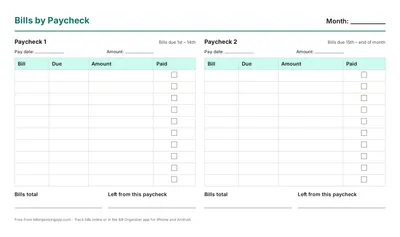
Two columns, one per paycheck, each with its own bill list, total and "left from this paycheck" line.
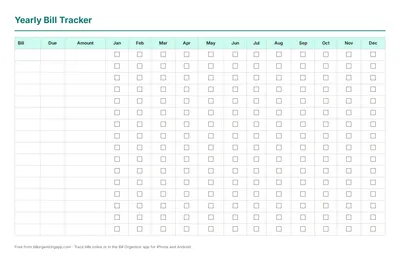
Yearly bill tracker
One row per bill and a paid box for each of the 12 months, for a binder or the fridge.
How to use a printable bill tracker
- List every regular bill once. Go through the last two months of bank and card statements: rent, utilities, phone, internet, insurance, loans, cards, subscriptions.
- Write the due date and the usual amount. For bills that vary, like electricity, use last month's amount and correct it when the bill arrives.
- Tick the box the day you pay and write the date. At a glance you can see what's still open.
- Fill in the bottom line. Total due, total paid, income and what's left over. That's a one-page monthly budget.
Paper or app?
Paper is hard to beat for seeing the whole month at once, and plenty of people keep one on the fridge or in a binder. Where paper falls short is reminding you. A printed sheet can't tell you a bill is due tomorrow. Many people combine the two: the online tracker or the phone app keeps the list and sends reminders, and a printout each month is the checklist.
Prefer a spreadsheet? The bill tracker template opens in Excel and Google Sheets with the totals already worked out.
More printable bill sheets
Want the month laid out by payday? The bill calendar maker prints a calendar with every bill and payday marked, plus what each paycheck has to cover. Starting from zero? Print the list of monthly bills checklist first, so nothing is missing, and total your subscriptions with the subscription tracker.
The money calculators people use most
Filling in the tracker often raises a money question: how long a card balance will take, what a partial month of rent costs, or how much rent fits your income. Work it out, then write the answer on your sheet.
- Credit card payoff calculator: months to zero and the interest an extra $50 saves
- Prorated rent calculator: rent for a partial month when you move in or out mid-month
- Debt-to-income ratio calculator: your DTI against the 36% and 43% lender limits
- Net worth calculator: assets minus debts, with your liquid net worth
- How much rent can I afford?: the 30% rule, the 25% rule and a debt-aware budget
- Debt snowball calculator: snowball vs avalanche, with your debt-free date
- Rent split calculator: split rent fairly by room size or income
- Electricity cost calculator: what an appliance costs to run per day, month and year
- Debt consolidation calculator: a consolidation loan vs keeping your cards
- Loan payment calculator: the monthly payment and total interest on any loan
Frequently asked questions
Is this printable bill tracker free?
Yes, free with no sign-up or email. Choose a layout, pick the month, and print it or save it as a PDF from the print dialog.
Can I fill in my bills before printing?
Yes. Add your bills to the free online tracker on this site, then tick "Fill in my bills". The sheet lists every bill due that month, including repeats of monthly bills, with blank rows left for extras.
How do I save it as a PDF?
Click Print, then choose "Save as PDF" (or "Microsoft Print to PDF" on Windows) as the printer.
Which layout should I use?
The monthly list is best for checking off bills as you pay them. The bill calendar shows when bills cluster around paydays. The by-paycheck sheet splits the month into two pay periods (1st–14th and 15th–end) so you can see what each paycheck has to cover. The yearly tracker gives each regular bill a row and a checkbox for all 12 months, handy for a binder or the fridge.
Can I print a whole year at once?
Yes. Choose "All 12 months" in the Month box and Print: you get one page per month (January to December) for the monthly checklist, bill calendar or by-paycheck layout, ready for a binder. Fill in your bills first and every page lists that month's bills, including repeats.
Is there a fillable PDF?
The sheet itself is the fillable part: change the title, pick the month, and tick "Fill in my bills" to print it already filled from your online tracker. Then choose Save as PDF in the print dialog. If you want to keep editing on a computer, the bill tracker spreadsheet template does the totals for you.
What should a bill tracker include?
At minimum: the bill name, due date, amount, and a paid checkbox with the date you paid. Adding income and a "left over" line at the bottom turns it into a simple monthly budget.
Prefer paper? Bill organizers and budget planners
#ad · AmazonAs an Amazon Associate I earn from qualifying purchases.
- Bill organizer & bill tracker bookA monthly log for due dates, amounts and paid checkmarks.See options on Amazon →
- Budget plannerUndated monthly budget pages with savings and debt trackers.See options on Amazon →
- Expense tracker notebookPocket-size log for day-to-day spending.See options on Amazon →
- Bill pay organizer folderMonthly pockets for paper bills and receipts.See options on Amazon →
Shopping for someone? See our gift guide for organizers and planner lovers.